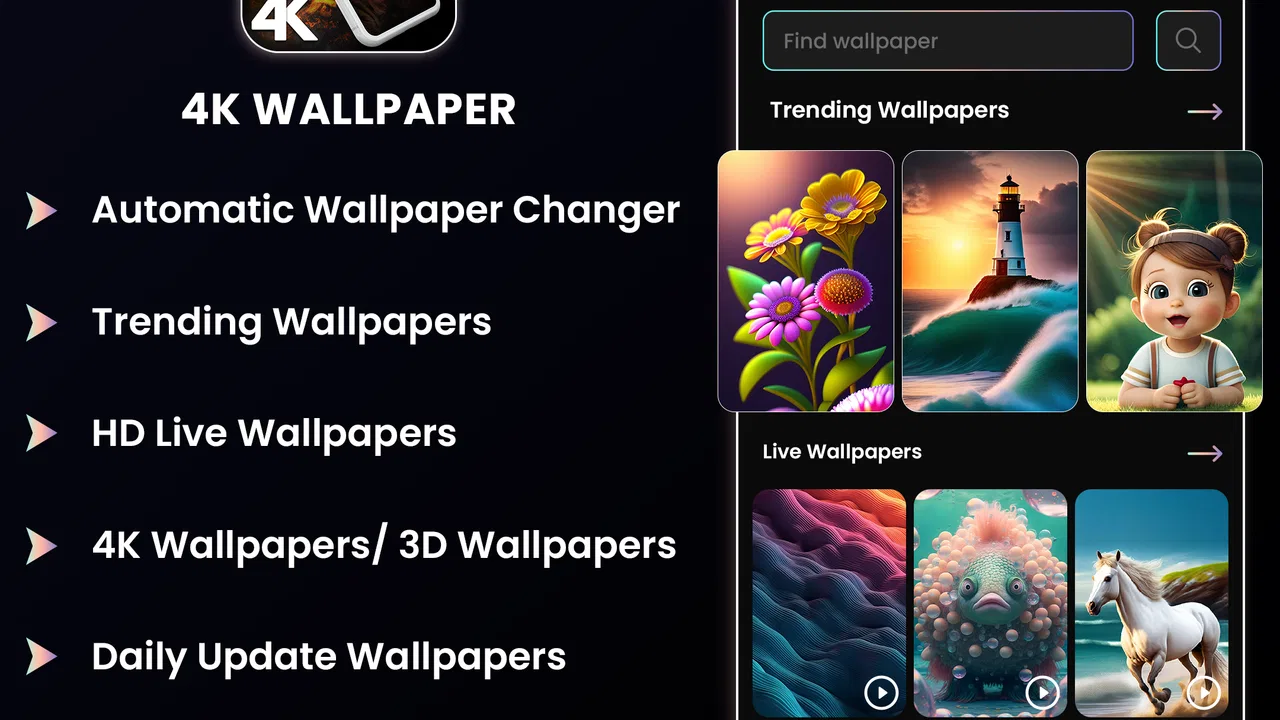
4K Wallpapers - HD Backgrounds
- 4.9
- Rating
- 1.00M
- Installs
- Free
- Price

 Analysis by App-foxy
I installed 4K Wallpapers - HD Backgrounds expecting a straightforward way to refresh my phone’s look, but the app is more useful when treated as a small personalization workspace rather than a simple picture browser. It belongs to the personalization category, comes from Technozer Solution, and focuses on high-resolution backgrounds with live-wallpaper and 3D-style customization. My first impression was positive: it gives a phone a noticeably different feel without requiring a complicated design skill set. The more important question, though, is whether it fits the way you actually use your device.
The app is free to start, which makes it easy to try without committing money immediately. It is marked for Everyone 10+, supports Android 9 and later, and its current version is 2.3.3. Its popularity is also substantial, with more than one million installs and a 4.9 average from around 7.7 thousand ratings. Those figures suggest that the basic experience works for many people, but they do not remove the practical issues that can appear when a wallpaper is applied, animated, or displayed differently by a particular phone.
Where the experience can get stuck
The first point of friction is choosing between a normal high-resolution background and something more dynamic. A still image is usually predictable: select it, crop it if necessary, and place it on the home screen, lock screen, or both when the phone offers those choices. A live wallpaper involves more steps outside the image itself. The phone’s wallpaper service, launcher, battery settings, and screen behavior all influence the final result. If a moving background appears static, disappears after a restart, or behaves differently on the lock screen, that does not automatically mean the app has failed.
You May Also Like

 Blood Strike: 2.5 Anniversary
Blood Strike’s Loadouts Turn Every Drop Into a Tactical Gamble
A close look at Blood Strike’s custom loadouts: how fast access to signature weapons reshapes its battle royale rhythm, rewards preparation, and narrows the gap between fights.

 Pandora - Music & Podcasts
Pandora’s Music Is Easy to Start, but Harder to Recover
Pandora’s strength is its low-effort path from a seed to a station. Its weak spot is how much confidence it asks you to place in connection, setup, and quiet recovery.

 8 Ball Pool
 Is Built on Rivalries, Rematches, and Routine
A close look at the rivalries, rematches, shared routines, and unanswered safety questions that turn a quick pool match into a persistent mobile community.

 Samsung Music
’s Quiet Strength Is Playing What You Already Own
Its reach comes less from spectacle than from dependable access to a personal library. That simplicity is both the app’s strongest retention engine and its ceiling.

 AccuWeather: Weather Radar
AccuWeather Review: A Quick, Clear Forecast for Everyday Decisions
For everyday plans, the best forecast is the one you can understand quickly. AccuWeather makes rain timing, radar, and local conditions easy to act on, with a few trade-offs.

 Hill Climb Racing
Why Hill Climb Racing Still Turns Crashes Into One More Run
A tiny car, a bumpy hill and one more upgrade: Hill Climb Racing keeps resurfacing because its simple chaos makes every near-miss feel personal.
More From Our News Desk



I found it helpful to decide what I wanted before browsing. For a clean home screen, I looked for a background with a quieter center so icons remained readable. For a lock screen, I cared more about whether the image left room around the clock and notifications. This sounds obvious, but it prevents a common disappointment: a visually impressive 4K image can become awkward once the launcher crops it and places icons over its brightest area.
The 3D-style customization is appealing when you want more depth than a standard wallpaper provides. It can make a familiar handset feel refreshed, especially if you keep the same case and icon layout for a long time. However, depth effects are not automatically better. On a smaller display, a busy scene may compete with app labels, widgets, and notification text. I would use a detailed animated option on a minimal home screen, not on a page already crowded with folders and widgets.
Another likely sticking point is the difference between preview and final presentation. A preview inside the app can look perfectly framed, while the phone’s own wallpaper picker may zoom or reposition it. Before judging the image, I checked it on the actual home screen and moved icons around where possible. This simple check matters more than the thumbnail because the launcher controls the usable composition.
There is also a practical cost to choosing motion. Live wallpapers can make a phone feel more responsive and personal, but they may not suit someone who wants maximum battery efficiency or a completely quiet background. The app is best for users who enjoy changing the visual atmosphere of their device. If you want one background that never moves and never needs attention, a conventional gallery or the phone’s built-in wallpaper tool may be a better match.
What I checked before applying a wallpaper
My most useful habit was to test one background fully before collecting a large set of favorites. I selected an image, applied it, returned to the home screen, opened a few apps, locked the phone, and checked it again. That short routine exposed cropping and visibility problems early. It also helped me decide whether a live option felt smooth enough for everyday use rather than merely attractive in a preview.
- Check icon contrast: bright details behind white labels can make the home screen tiring to read.
- Check clock placement: a strong focal point near the top may clash with lock-screen information.
- Check motion comfort: animated depth is not ideal if you prefer a calm, distraction-free screen.
- Check the final crop: the phone may frame the image differently from the in-app preview.
These checks are especially useful because the app’s main attraction is visual. A wallpaper can be technically sharp and still be a poor daily choice. I would rather spend a minute testing composition than repeatedly changing backgrounds after discovering that an important subject is hidden behind icons.
Setup checks that prevent avoidable problems
Before using the app seriously, I would confirm that the phone runs Android 9 or newer and that there is enough free storage for the backgrounds I intend to keep. The app itself is free, but optional in-app purchases range from $2.99 to $99.99 per item. I recommend paying attention to the purchase screen and deciding whether the free selection already meets your needs. For occasional wallpaper changes, it may be unnecessary to buy anything; for someone who wants a broader customization routine, the optional spending deserves a deliberate decision rather than a rushed tap.
I also checked the phone’s own wallpaper settings after installation. Many Android devices separate home-screen wallpaper, lock-screen wallpaper, and live-wallpaper selection into different menus. If the app opens the system picker, that is a normal part of the process, not an indication that the content has been lost. I followed the on-screen selection carefully and confirmed which screen I was changing before accepting.
A stable connection is sensible while browsing or loading high-resolution material, even though the final wallpaper may be stored locally afterward. When an image takes longer to appear, I first checked whether other apps could load normally. Switching between mobile data and Wi-Fi, then reopening the app, is a reasonable general troubleshooting step. I would avoid repeatedly tapping an apply button while a preview is still loading because that can make it unclear which action actually completed.
Notifications and battery behavior are worth considering before choosing a live background. Android manufacturers often include battery-saving modes that restrict background activity. If a live wallpaper stops animating after the screen has been idle, I would inspect the phone’s battery settings and launcher behavior before blaming the app. The exact menus vary by device, but the general principle is consistent: aggressive power saving can limit visual effects.
For a first setup, I used a simple sequence: browse, preview, apply, verify the home screen, lock the phone, and then restart only if something looked inconsistent. I did not begin by changing several system settings at once. Keeping the process simple makes it easier to identify whether the issue comes from the selected wallpaper, the system picker, or the launcher.
How I made the home screen easier to live with
I treated wallpaper selection as part of the phone’s layout rather than as decoration in isolation. A darker image helped icons stand out, while a scene with open space near the lower half worked better behind a dock. When I wanted a more dramatic background, I reduced visual clutter elsewhere by moving rarely used apps off the first page. This is one of the app’s less obvious strengths: it encourages you to reconsider the entire screen arrangement, not just swap one image for another.
For live wallpapers, I preferred subtle movement over constant visual activity. A restrained effect was easier to ignore while reading or working, whereas a highly active background kept drawing my attention. I would also avoid pairing an animated wallpaper with a large number of widgets, because both compete for the same visual space and can make the phone feel busy.
Users who share a device with children should remember the Everyone 10+ content rating and review the available material themselves. That rating provides a general age guide, but personal suitability still depends on the images a family is comfortable displaying. This is particularly relevant when the app is used on a shared tablet or a phone that other people regularly see.
Recovering the workflow when something goes wrong
When a wallpaper did not appear as expected, I used the least disruptive recovery path first. I returned to the app, selected the same background again, and reapplied it through the system picker. If the preview itself was incomplete, I closed and reopened the app rather than changing several phone settings. This approach separates a loading problem from an application problem and avoids unnecessary resets.
If the image appeared on the home screen but not the lock screen, I checked the system’s separate lock-screen choice. Some phones allow independent selections, while others handle both screens together. The important point is to verify the target screen in the device settings. A successful home-screen change does not prove that the lock-screen setting was changed too.
If a live wallpaper reverted to a still image, I checked three things in order: whether the chosen item was actually a live option, whether the phone’s wallpaper service accepted it, and whether battery-saving software had restricted it. I then locked and unlocked the device. If the effect returned after reopening the screen, the problem was likely a temporary system or launcher state rather than the visual file itself.
Clearing the app from recent apps and reopening it can help with a stalled preview. I would not immediately clear all app storage because that may remove local preferences or saved choices. If the phone has a built-in restart option, a normal restart is a safer next step than repeatedly reinstalling. Reinstallation is better reserved for a persistent problem that survives simpler checks.
Another useful recovery technique is to test a different wallpaper. If one image applies correctly and another does not, the issue is probably tied to that selection, its preview state, or how the phone handles its format. If nothing applies, the system picker or launcher becomes the more likely place to investigate. This comparison is much more informative than assuming every failure has the same cause.
I would also keep expectations realistic around screen quality. A high-resolution source cannot make a low-resolution display look sharper than its hardware allows. Conversely, a phone with a tall aspect ratio may crop a wide composition more aggressively. The result can look different from the preview without being defective. Choosing an image with a flexible composition is often a better solution than trying to force a tightly framed subject onto every screen.
When the app is not the cause
Wallpaper problems are often blamed on the app because it is the visible part of the process, but Android’s launcher controls much of what happens afterward. A third-party launcher may handle cropping, icon placement, or live backgrounds differently from the manufacturer’s default launcher. If the same wallpaper behaves normally with the default launcher, that comparison gives a useful clue without requiring technical tools.
Battery optimization is another frequent source of confusion. A phone may pause background effects when it enters a restrictive power mode, especially when the battery is low or the device is configured to limit background activity. If the wallpaper works while the phone is actively in use but stops after a long idle period, I would inspect those settings before concluding that the app is unreliable.
Storage pressure can also affect the experience. If the phone is nearly full, previews may load slowly and downloaded backgrounds may not behave consistently. Removing unused files or apps can be more effective than repeatedly tapping the download or apply controls. This is a general device check, but it is particularly relevant when working with large, detailed backgrounds.
Screen settings may change the perceived result as well. Display zoom, dark mode, icon themes, and manufacturer-specific lock-screen layouts can alter contrast and framing. I found that a wallpaper that looked balanced on one setup could feel too bright or crowded after changing the icon pack. That is why I judge the complete home screen, not just the image by itself.
For users who want automatic daily changes, a dedicated wallpaper rotation tool may be more suitable if that is its primary purpose. This app appealed to me more as a hands-on customization choice, especially when I wanted to browse and select a particular visual mood. Someone who dislikes manual changes, live effects, or system-picker steps may prefer a simpler built-in solution, even if it offers fewer striking backgrounds.
Who should use it and who should skip it
I would recommend 4K Wallpapers - HD Backgrounds to someone who enjoys refreshing a phone’s appearance and wants more visual variety than the default wallpaper collection provides. It is also a good fit for users who like experimenting with depth and motion, provided they are willing to check how those effects interact with the launcher and battery settings. The free entry point makes trying the basic experience straightforward.
I would be more cautious recommending it to someone with an older or heavily customized Android setup who expects every live effect to behave identically to the preview. The minimum supported system is Android 9, but support at the operating-system level does not guarantee identical behavior across every manufacturer interface. If your priority is stability above all else, a static image from the built-in wallpaper picker is the safer choice.
It may also be the wrong app for anyone who wants a completely distraction-free phone. Detailed 4K scenes and animated backgrounds can make the screen feel lively, but they can also compete with reading, work, or accessibility-focused layouts. In that situation, a plain color, a low-detail image, or a system wallpaper may serve you better.
People considering paid content should decide based on actual use rather than the headline appeal of premium customization. Since optional purchases can reach $99.99 per item, I would start with the free experience, test several backgrounds, and only then consider spending. The app can be enjoyable without turning wallpaper changes into a major purchase, but the payment range makes careful attention worthwhile.
My practical verdict after using it
The strongest reason to try this app is the combination of sharp backgrounds and a more expressive live-wallpaper approach. It gives me enough room to change the mood of a phone without forcing me into a complicated editing workflow. I especially liked the ability to think about composition, icon readability, and motion as separate choices instead of accepting whatever the default system offers.
Its limitations are mostly practical. The final appearance depends on the phone’s launcher and wallpaper service, live effects may not suit battery-conscious users, and high-resolution previews do not guarantee perfect framing on every display. The app also requires a little judgment: the most dramatic image is not always the most usable one, and optional purchases should be approached carefully.
Technozer Solution has made a personalization app that is easy to explore but rewards a more considered setup. I would install it when I wanted to redesign the look of my phone, not when I needed a completely automatic or invisible utility. Start with one still background, verify the crop, then try a live option if your device handles it comfortably. That workflow gives you a fair impression without confusing a launcher or battery-setting issue with an app failure.
Overall, I think it is a worthwhile free download for Android users who enjoy visual customization and are comfortable checking a few system details. The 4.9 average and more than one million installs reflect strong interest, but my recommendation is based on the practical experience: it works best when you choose backgrounds around your screen layout, test the result on the actual device, and treat motion as an optional style rather than a requirement.
FAQs for 4K Wallpapers - HD Backgrounds
01What features does 4K Wallpapers - HD Backgrounds offer?
4K Wallpapers - HD Backgrounds offers a wide variety of high-resolution wallpapers and backgrounds, specifically crafted for both Android and iOS devices. Users can browse through categories such as nature, architecture, abstract art, and more. The app also includes daily updates, allowing users to discover new content regularly and keep their devices looking fresh.
02Is 4K Wallpapers - HD Backgrounds free to use?
Yes, the app is free to download and use, providing access to a vast collection of wallpapers. However, it may include in-app purchases or ads to unlock premium features or remove advertisements. Users can choose to upgrade if they prefer an ad-free experience or want more customization options.
03How often does the app update its content?
The app provides daily updates to its wallpaper collection, ensuring users always have access to the latest and trendiest backgrounds. This frequent updating means that users can consistently find new and exciting visuals to personalize their devices, keeping their home and lock screens fresh and engaging.
04Can I use the wallpapers offline?
Once a wallpaper is downloaded, it can be used offline. Users can save their favorite wallpapers to their device's gallery for easy access without needing an internet connection. This feature is particularly useful for those who wish to change their wallpapers while on the go or in areas with limited connectivity.
05Is 4K Wallpapers - HD Backgrounds compatible with all devices?
The app is designed to be compatible with a wide range of Android and iOS devices. It optimizes the wallpapers to fit various screen sizes and resolutions, ensuring high-quality visuals on smartphones and tablets alike. However, it’s always recommended to check compatibility with your device’s operating system version before downloading.
Pros
- Extensive library of 4K wallpapers.
- User-friendly interface and navigation.
- Daily updates with fresh content.
- Option to save favorites for quick access.
- Lightweight app with minimal storage use.
Cons
- Contains ads that can be intrusive.
- Limited customization features.
- Some wallpapers require premium access.
- Occasional loading delays on slower networks.
- No option for automatic wallpaper change.

4K Wallpapers - HD Backgrounds
Gallery